Online sales
Event information and ticket purchasing formed the initial product.


Media & Entertainment · Live ticketing
A live-event ticketing business launched a focused sales platform, connected seat availability to purchasing, and expanded into an iOS application for entry checks at the venue.
The business context
The client had relationships with event organizers and wanted to build an online ticketing business. Its initial budget could not support every feature of a mature ticketing platform. The first practical goal was to publish events and let audiences buy tickets through a clear, usable experience.
Shinetech helped define and deliver that starting scope. A simple interface kept the first release focused, while later work could follow actual operating needs. The product grew from event presentation and online purchasing into broader ticket operations, including a mobile tool for checking entry at the venue.
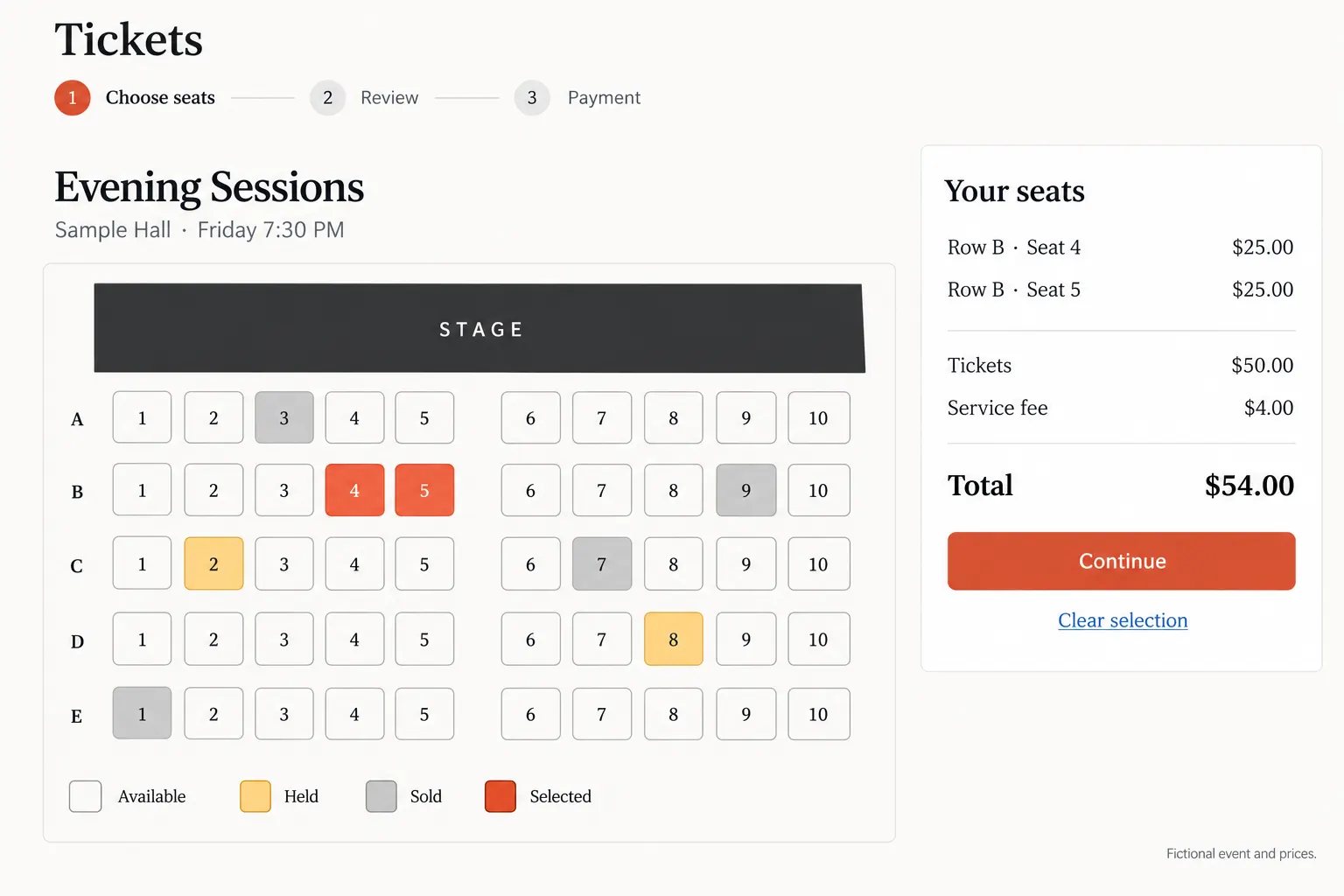
A fictional performance shows available, held, sold, and selected seats as different states. Reconstructed interface with invented event and pricing data; not the client’s screen. View full-size interface (new tab)
The operating challenge
A seat map shows a choice, but the purchasing system has to decide whether that choice is still available. Seats may be available, temporarily held, or sold. If the display and the underlying transaction disagree, a buyer can select something the system can no longer sell.
Concurrent purchase attempts made this more than a visual-design problem. The platform needed to handle competing requests for the same seat while keeping the buying flow practical. A limited feature budget did not remove the need to protect the central promise of the product: a ticket should represent a valid place at the event.
The delivery decisions
The initial platform concentrated on event display, performance information, and online purchasing. A restrained interface helped keep early development focused on the work needed to start ticket sales.
The team implemented seat selection and coordinated seat states with the purchase flow. Handling concurrent requests addressed the risk of selling the same seat twice, rather than relying on the seat map alone to prevent conflicting choices.
After the core sales functions were in use, the platform continued to evolve with the business. A companion iOS application supported on-site ticket checks, connecting the online purchase journey with the staff admitting attendees.
How the workflow holds together
The initial tradeoff was to postpone breadth while delivering the essential sales capability. Event information, a seat choice, and a completed order had to work together. The seat-state problem belonged in that core because it affected whether the ticket being sold was valid.
Continued development and support followed the first release. The client could expand around an operating product, adding capabilities as ticket sales and venue operations developed. The later entry-checking application extended the original purchase workflow to the staff admitting attendees.
The delivered result
Event information and ticket purchasing formed the initial product.
Selection and purchase processing accounted for competing requests.
An iOS application extended the workflow into on-site ticket checks.
The first ticket-selling release became the foundation for continued feature development, venue-entry support, and technical maintenance.
Case taxonomy
Discuss your project
Tell us how your business works and where your software needs to change.
Get in touch
Tell us what you need to build, modernize, automate, or augment with AI. We can start with a focused discussion or a no-risk 1-week trial.

“A fantastic company to work with.” After the initial rapid development project, American Shipping Co. kept two Shinetech developers embedded for nearly four years, supporting internal and external tools and new AI initiatives.
 CEO, American Shipping Co. - 5-star Google Review