Responsive camera access
Users could work with location-based camera views through the delivered frontend.


Hospitality · Camera review
A restaurant technology provider gained a responsive camera-review interface that connected locations, live views, archived footage, and clip export through its existing video services.
The business context
For a business operating across restaurant locations, reviewing an incident starts with two practical questions: where did it happen, and when? An operator then needs the right camera, the relevant part of the recording, and a way to retain the useful segment.
The client already had backend, storage, and video-forwarding services. Shinetech’s role was to turn those capabilities into a responsive camera-management experience, connecting location selection, live monitoring, archived playback, and video download through the existing APIs.
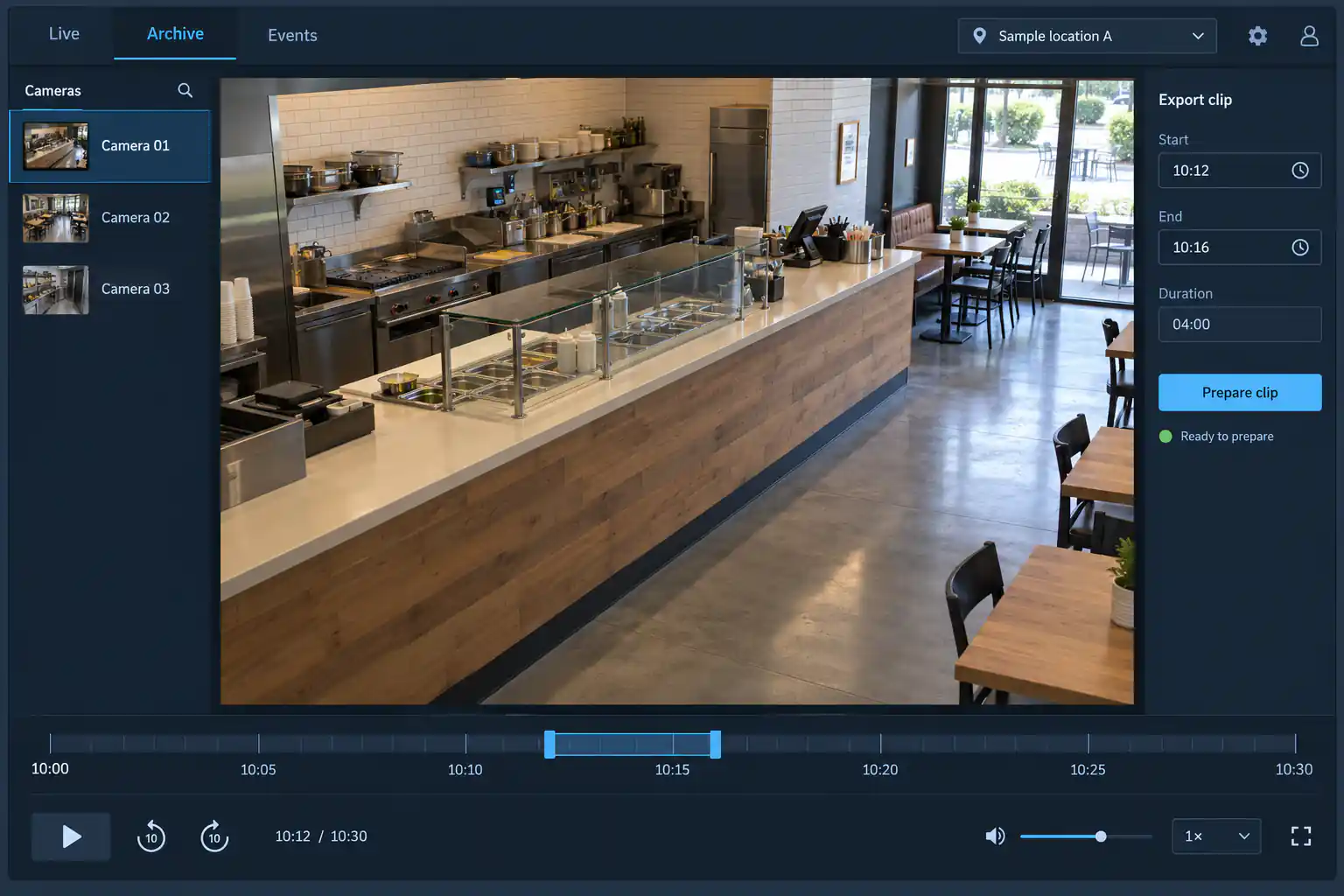
A generated restaurant scene and fictional camera records illustrate archive review. The location, footage, timeline, and controls are illustrative, with no customer surveillance data. View full-size interface (new tab)
The operating challenge
Live viewing, historical playback, and event review involve different navigation. A live grid provides a broad view; investigating a past moment requires a narrower location, camera, and time range. Users also need the controls to move through that range without losing their review context.
Requirements evolved during delivery. Events moved from timeline markers into a separate page, and archived footage gained a playback dialog. These changes affected UI behavior, API agreements, and test scope, so they needed to be handled across the frontend and client service boundary.
The delivery decisions
The interface connected authentication and location access with camera selection. Search, filters, and grid or single-camera views supported moving from a group of feeds to the camera relevant to the operator’s task.
Timeline navigation, playback speed, and time-range selection supported focused review. Existing player and timeline components were integrated into the application, with clip export connecting the selected footage to a practical follow-up action.
Shinetech implemented the React and TypeScript frontend, state management, API integration, deployment, and QA/UAT. The client retained responsibility for backend services, storage, and video forwarding, including the existing video-service integration.
How the workflow holds together
Moving events out of the timeline changed how a user reached relevant footage. The team tracked the change through sprint reviews and a change list, updating the interface, service agreements, and checks rather than silently extending the original scope.
The modular organization—authentication, locations, live feeds, archives, events, and downloads—gave the work clear areas to develop and review. Integration testing and UAT were needed at the points where a selected location or time interval became a request to the client’s services, because a plausible screen alone could not establish that the footage workflow worked.
The delivered result
Users could work with location-based camera views through the delivered frontend.
Playback and timeline interactions supported finding a relevant period in historical footage.
Export and download capabilities connected the review task with the existing video services.
The camera-management application was delivered and remains in use. Shinetech’s contribution covered the frontend and its integrations; the client operates the backend, storage, and video services.
Case taxonomy
Discuss your project
Tell us how your business works and where your software needs to change.
Get in touch
Tell us what you need to build, modernize, automate, or augment with AI. We can start with a focused discussion or a no-risk 1-week trial.

“A fantastic company to work with.” After the initial rapid development project, American Shipping Co. kept two Shinetech developers embedded for nearly four years, supporting internal and external tools and new AI initiatives.
 CEO, American Shipping Co. - 5-star Google Review