Large-file upload
Sports clips were too large for a basic form-upload experience.


Sports media case study
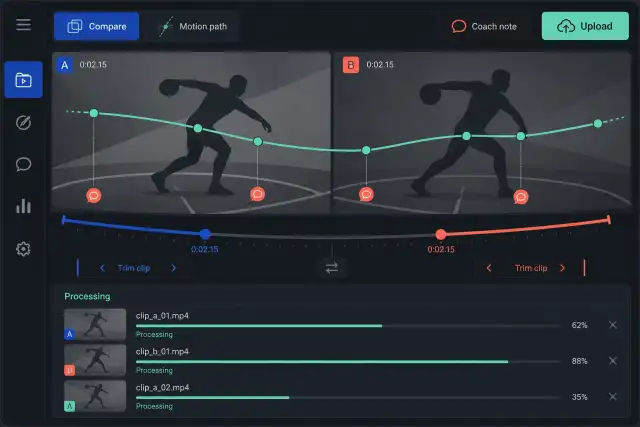
A media platform needed to help sports participants upload, watch, edit, compare, and share original video while also supporting instruction from experienced coaches.
The situation
The planned destination covered many sports and needed to help users find relevant clips, upload and edit their own material, compare techniques with peers, and learn from experienced instructors.
That experience depended on a reliable media pipeline behind the interface. Large user files had to upload smoothly, convert on the server, play consistently, and support visual editing and annotations.
The challenge
Users should not have to understand file formats, server processes, or vector conversions to share and improve a clip.
Sports clips were too large for a basic form-upload experience.
Uploaded formats had to become consistent playback media without overwhelming server resources.
Vector paths and drawing commands had to support useful visual editing and technique annotation.
The solution
The team researched the difficult media operations early and designed each one as part of the user journey rather than an isolated technical utility.
Use an interactive uploader suited to large files and provide clear processing status.
Invoke FFmpeg from the Java environment and limit concurrent conversion work to protect server capacity.
Translate SVG path data into usable drawing commands and exchange complex data through web services.
How we worked
Technical research focused on vector editing and server-side video conversion, the two areas most likely to prevent the product experience from working.
A demonstration environment made progress visible and allowed the client to review the product throughout development.
Regular reports and direct communication kept unexpected issues visible while the team completed upload, editing, playback, and service integration.
Prove the editing and transcoding approach.
Move large user clips into the processing flow.
Create consistent server-side playback media.
Join viewing, editing, sharing, and coaching.
The result
The documented application combined user-facing video tools with the upload, conversion, vector-processing, playback, and service foundation needed to support them.
Technical conversion work was presented as a clear experience rather than a manual file task.
Users could compare and share clips instead of only watching them.
Conversion concurrency was limited to reduce unnecessary processing pressure.
Case taxonomy
Make complex media workflows usable
Get in touch
Tell us what you need to build, modernize, automate, or augment with AI. We can start with a focused discussion or a no-risk 1-week trial.

“A fantastic company to work with.” After the initial rapid development project, American Shipping Co. kept two Shinetech developers embedded for nearly four years, supporting internal and external tools and new AI initiatives.
 CEO, American Shipping Co. - 5-star Google Review