Delivered
The team completed the replacement middleware, including protocol work, interface development, and testing.


Healthcare · Laboratory middleware
A laboratory-equipment manufacturer replaced analyzer middleware with a WPF desktop application, working through incomplete device documentation and differences between hospital laboratory systems.
The business context
A manufacturer of blood-analysis equipment needed to replace middleware used alongside its instruments. Local software requirements and requests from hospital customers shaped the project. The practical requirement was to connect the equipment with each hospital's laboratory information system, or LIS.
The engagement covered protocol analysis, demonstration tests, desktop interface development, testing, and later maintenance support. Its users and stakeholders spanned the equipment supplier and hospital systems, making the connection between them central to delivery.
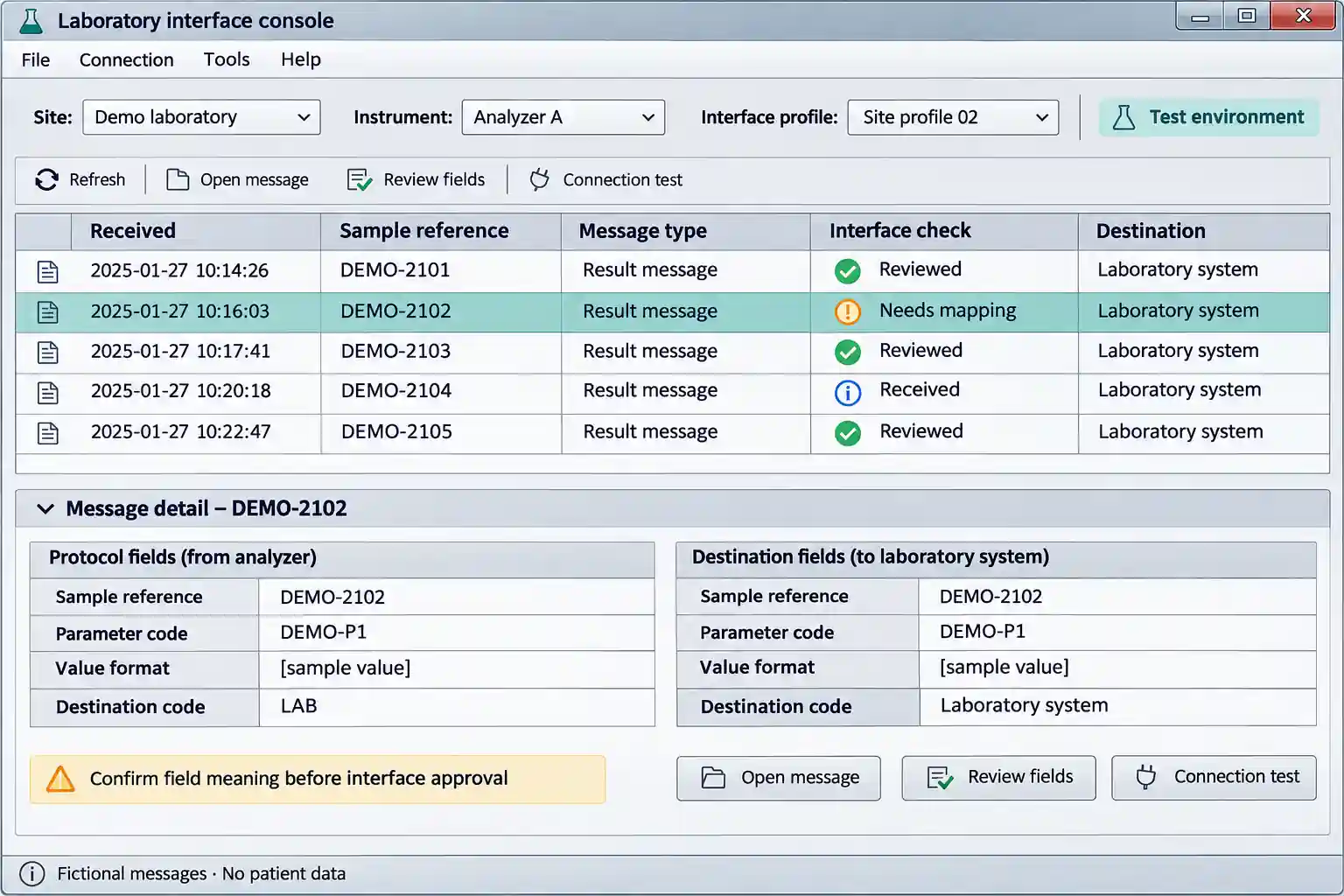
Reconstructed middleware concept using fictional messages and placeholder values. It illustrates interface review, not a clinical decision screen or an exact customer screenshot. View full-size interface (new tab)
The operating challenge
Device protocol documentation was incomplete. The team needed to understand how the instrument communicated before a finished desktop screen could provide a useful connection. A large set of blood-analysis parameters also required domain research so that unfamiliar fields were not treated as interchangeable labels.
Hospital LIS implementations differed. Work completed for one destination did not remove the need to adapt and test the next hospital connection. The operating challenge therefore combined device communication, parameter meaning, and the requirements of the receiving system.
The delivery decisions
The team analyzed the available protocol information and used demos to test its understanding. This brought communication questions into the engineering work before they could be hidden behind a completed interface.
A WPF application provided the software layer for the replacement middleware. Interface development proceeded alongside testing of the instrument-facing and hospital-facing work.
Differences between LIS implementations required additional work for each hospital. Testing and later maintenance support were part of delivering the application into those environments.
The working detail
For this project, understanding the analyzer's many parameters was an engineering prerequisite. Research into those fields supported the interface work; the engagement did not establish new diagnostic logic or a clinical interpretation service.
The case illustrates a data-integration problem at the instrument boundary. A general warehouse pipeline would not by itself resolve an undocumented device message or a hospital-specific interface. Those questions had to be addressed in the middleware and its testing.
The delivered result
The team completed the replacement middleware, including protocol work, interface development, and testing.
The project record reports deployment at multiple hospitals and normal operation after delivery.
Later support covered the software in its hospital operating environments.
No specific hospital count, diagnostic-performance improvement, or certification is claimed. The source establishes software delivery and deployment; it does not identify a universal interface standard supported by every installation.
Case taxonomy
Discuss your project
Tell us how your business works and where your software needs to change.
Get in touch
Tell us what you need to build, modernize, automate, or augment with AI. We can start with a focused discussion or a no-risk 1-week trial.

“A fantastic company to work with.” After the initial rapid development project, American Shipping Co. kept two Shinetech developers embedded for nearly four years, supporting internal and external tools and new AI initiatives.
 CEO, American Shipping Co. - 5-star Google Review