Format variation
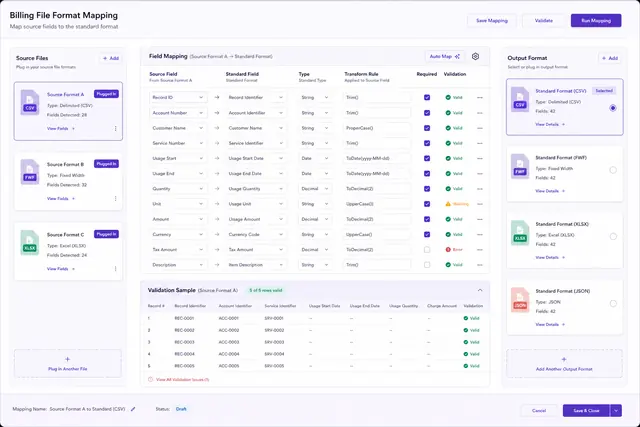
Each carrier file structure required its own source-to-target field mapping and processing logic.


Telecommunications analytics case study
A telecommunications billing-analysis provider needed to ingest several carrier file formats, standardize their fields, and let customers review or export management reports through the web.
The situation
The provider analyzed landline, mobile, voice, data, and paging charges for business customers. Management relied on a concise set of telecommunications performance indicators to spot areas that needed investigation.
Carrier data arrived as DBF, BIL, CSV, text, fixed-width DAT, and MDB files. Users needed a web system that could process those sources automatically, store standardized data, and make reports available for review or download.
The data challenge
The system needed a repeatable ingestion path, configurable management functions, and flexible report output across many customer accounts.
Each carrier file structure required its own source-to-target field mapping and processing logic.
The web application needed upload, processing, report, client, configuration, and allocation controls.
Processed data had to support filters, totals, browser viewing, and several export formats.
The solution
The team separated each billing format into a dedicated import package, then used a coordinating package, web services, and SQL Server jobs to run the appropriate workflow.
Define the field relationship between every carrier format and the standardized target data.
Use a main SSIS package to select and manage the required format-specific subpackage.
Use SSRS, database views, queries, and web services to generate filtered reports in browser and export formats.

How we worked
Field mapping clarified what each billing file contained and how it should enter the common database.
Dedicated subpackages isolated format rules, while a main package determined which processing path to invoke through web services and scheduled database work.
Report behavior was built on standardized data access and business entities so filtering, totals, and export options could be applied consistently.
Define source fields and the standardized target.
Run the correct format-specific SSIS package.
Store validated billing data in the shared model.
Generate web, PDF, Excel, or HTML output.
The result
The source documents a web reporting solution that combined format-specific ingestion, centralized orchestration, standardized data, and flexible report generation; it does not provide a quantified business result.
A new or changed source format could be addressed in its own import package rather than rewriting the whole pipeline.
Upload, processing, setup, generation, client, configuration, and allocation work shared the same system.
Filters, totals, online review, and export choices supported different management needs.
Case taxonomy
Turn source variation into reporting clarity
Get in touch
Tell us what you need to build, modernize, automate, or augment with AI. We can start with a focused discussion or a no-risk 1-week trial.

“A fantastic company to work with.” After the initial rapid development project, American Shipping Co. kept two Shinetech developers embedded for nearly four years, supporting internal and external tools and new AI initiatives.
 CEO, American Shipping Co. - 5-star Google Review