

Field Service · Visit Preparation case study
Preparing field technicians with Salesforce visit briefings
Salesforce Field Service turns service history and operational constraints into a focused mobile briefing for technicians.
The situation
The next visit needed more than an appointment record
An appointment and address did not always give a technician the previous diagnosis, parts position or access information needed for the visit. Notes existed across work orders, asset history and dispatch conversations.
The problem was not a lack of history. It was finding the small part of that history that changed the next visit.
The challenge
Useful context had to fit the moment of work
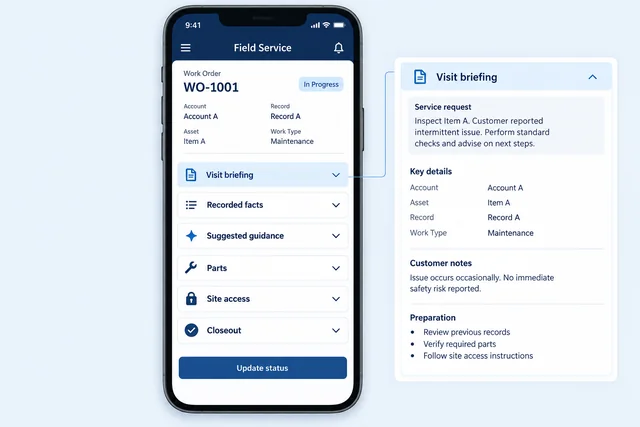
A briefing needed to distinguish verified facts from generated guidance, work on a mobile screen and stay current when parts or scheduling changed. Any suggested action also had to respect dispatch ownership and technician permissions.
The solution
A focused briefing sat beside the work order
Agent assistance explained and organized the context; it did not silently change the schedule or complete operational actions.
The briefing focuses on information that can affect the visit: earlier work, parts and site access. Generated suggestions are distinguished from recorded facts, while dispatch and the technician retain operational decisions.
Pre-visit review highlighted parts and access information that could affect the job.
Visit closeout kept the outcome with the work record for the next appointment.
How we work
Follow one visit from dispatch through the next briefing
The team followed a representative job through dispatch, the technician’s mobile briefing and closeout. Each visit moment calls for different context, so the briefing content was chosen moment by moment: asset history, earlier visit notes, parts, skills and access constraints were reviewed for the moment when they could change the technician’s next action, rather than copied from the full work history.
Review followed the briefing from dispatch to the mobile work order and visit closeout, including changed parts or access information. Generated guidance remained separate from the technician’s recorded work and any dispatch decision.
The result
The next visit starts with a useful briefing
Technician
The mobile view brings the asset, previous visit and current constraints together beside the work order.
Dispatch and service
Parts, access or scheduling changes stay visible against the same work context used by the technician.
Closeout information from a completed visit becomes part of the preparation for the next appointment, keeping the briefing tied to the service history.
Case taxonomy
Explore the industry, technology, and business need.
Industry and product
- Field Operations
Technology and delivery
- Salesforce Field Service
- Mobile
Business need
- Technician Briefings
- Service History
- Visit Preparation
- Work Orders
Discuss your business systems
Need Salesforce to fit the way your team works?
Get in touch
Ready to build software that fits your business?
Tell us what you need to build, modernize, automate, or augment with AI. We can start with a focused discussion or a no-risk 1-week trial.

“A fantastic company to work with.” After the initial rapid development project, American Shipping Co. kept two Shinetech developers embedded for nearly four years, supporting internal and external tools and new AI initiatives.
 CEO, American Shipping Co. - 5-star Google Review