Scheduling decisions
Staff can compare current constraints and select sessions as the timetable develops.


Education · Course operations
A tutoring organization connected enrollment, staff-guided scheduling, actual attendance, and recording access so one course could be managed before, during, and after class.
The business context
For a tutoring business that supports university courses, an empty classroom is only the beginning of a scheduling decision. The students have lectures at their own universities. Instructors teach other groups. Courses run across campuses, and a student may be enrolled in more than one subject. The organization has to find a time that makes its teaching commitment workable for the people who bought the course.
The client had been collecting enrollment information and arranging classes manually. It needed a shared operating system for the front desk, teaching staff, finance team, and students. Shinetech built that system around the course enrollment: the record that connects what a student purchased to the lessons they attend and the recordings they may access afterward.
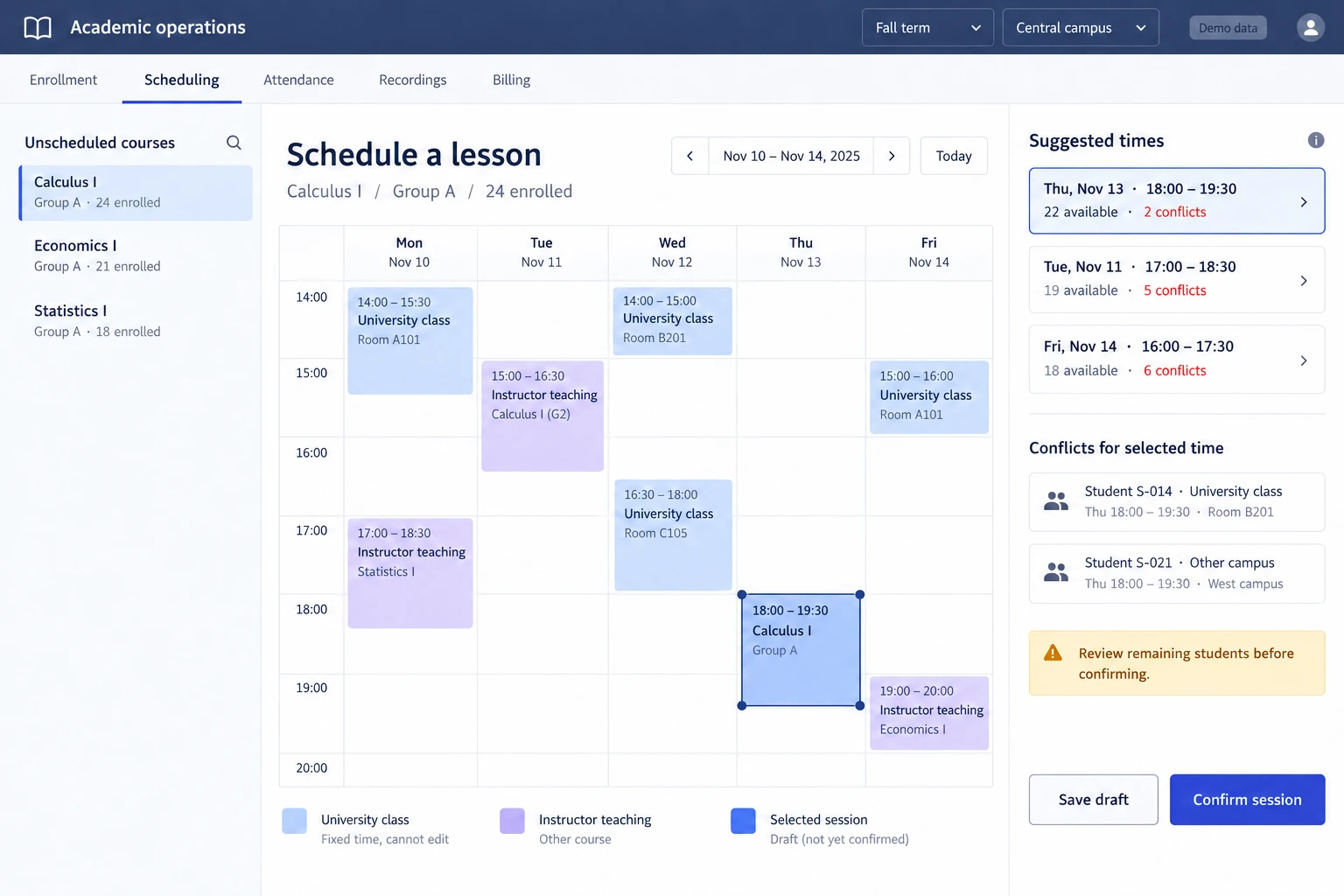
A scheduling decision in context: the selected lesson fits 22 of 24 fictional students, while two conflicts remain for staff to review. Reconstructed interface with invented data; not the client’s screen. View full-size interface (new tab)
The operating challenge
Consider a group whose members can attend different evenings. A time that suits most of the group may conflict with another university class for the remaining students. Scheduling a second group can resolve that conflict, but it also uses an instructor and a room that another course might need. Once staff commit a session, the available choices across the timetable change.
The scheduling workflow therefore had to help staff make a sequence of decisions. Shinetech implemented candidate times that account for university schedules, existing teaching commitments, and classes already arranged elsewhere. The system identifies options that block fewer students; staff select a session and continue with the updated availability. The result is assisted scheduling, with the operational tradeoffs still visible to the people making the decision.
The delivery decisions
Course prices, enrollment, charges, and contracts establish the student’s relationship to a course and academic term. Students can see their own classes and outstanding bills. Staff use their role-specific workspace to handle enrollment and payments, while the timetable connects that enrollment to actual teaching sessions. University and vocational-training terms remain separately managed within the same system.
Instructors activate lessons; teachers and front-desk staff record who attended, who arrived late, and how much time was missed. Those details matter beyond a simple present-or-absent flag. The application preserves actual attendance as its own measure. A student who later watches the recording does not retroactively become present at the live lesson.
A recording is part of the course service, with access determined by enrollment dates, attendance, purchased video options, and make-up arrangements. Some students can watch online; others need an on-campus viewing reservation. The system tracks viewing time and remaining allowances independently of attendance, so staff can resolve an access question from the course record rather than treating every video as freely available content.
How the workflow holds together
A missed class may require an attendance entry, a check of the student’s make-up arrangement, and a recording reservation. Those are related actions, but they have different meanings. The system connects them without collapsing them into one status. Enrollment establishes the eligible course period; attendance records what happened; the recording rules determine the next available option.
Assignments, course materials, and grades complete that course history. Different roles can do their work within the same platform without giving students access to administration. This is the practical value of the connected workflow: the front desk, instructor, and student work from the same course relationship, while the rules for teaching, payment, and access remain distinct.
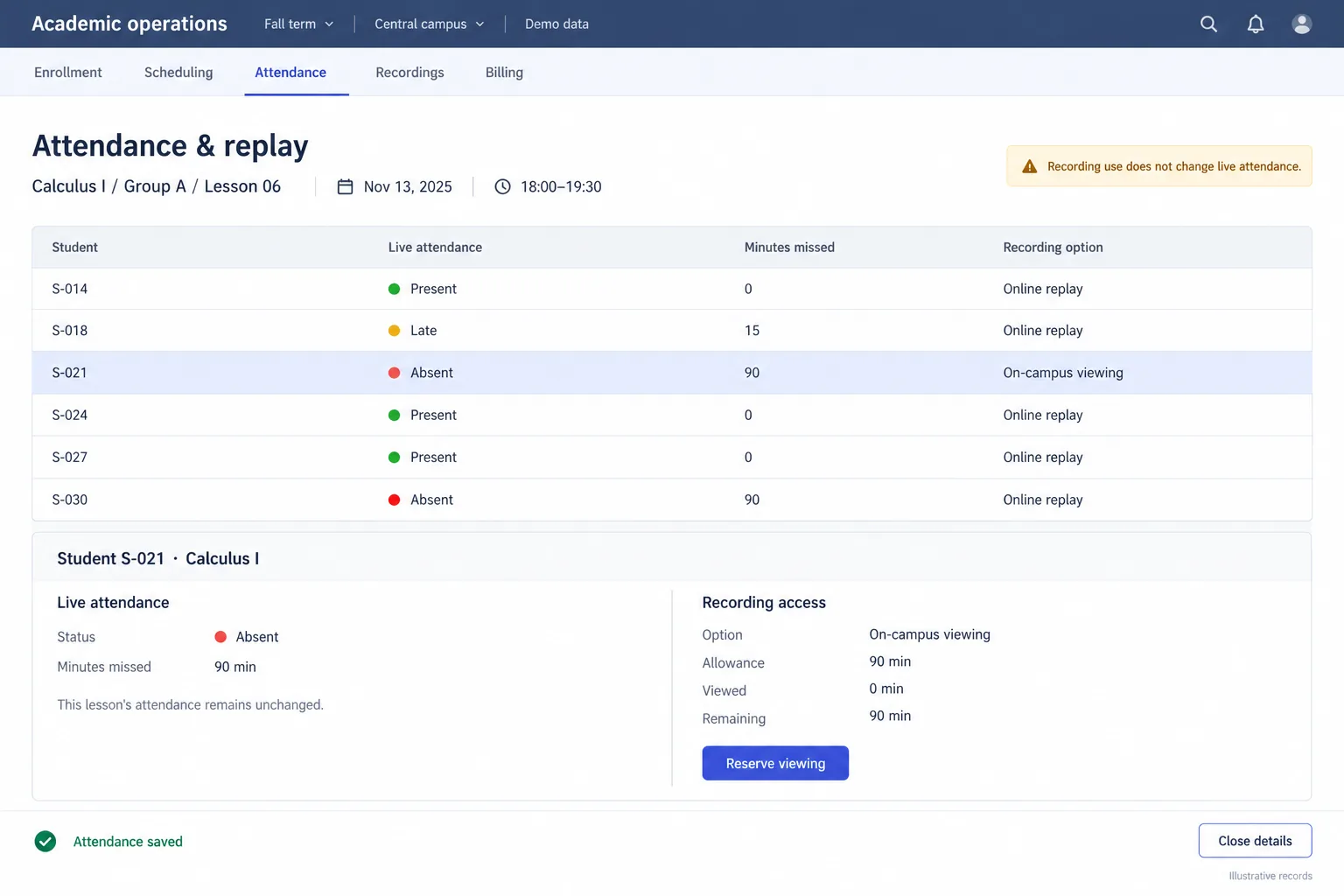
A second view of the same fictional course: Student S-021 remains absent from the live lesson, while an on-campus recording allowance is managed separately. Reconstructed interface with invented records; not the client’s screen. View full-size interface (new tab)
The delivered result
Staff can compare current constraints and select sessions as the timetable develops.
Live attendance and later recording use remain separate, explainable records.
Online and on-campus replay options follow the student’s enrollment and allowances.
The delivered platform is in maintenance. The available evidence establishes the operating capabilities; it does not include a measured reduction in scheduling time or an improvement in student grades.
Case taxonomy
Discuss your project
Tell us how your business works and where your software needs to change.
Get in touch
Tell us what you need to build, modernize, automate, or augment with AI. We can start with a focused discussion or a no-risk 1-week trial.

“A fantastic company to work with.” After the initial rapid development project, American Shipping Co. kept two Shinetech developers embedded for nearly four years, supporting internal and external tools and new AI initiatives.
 CEO, American Shipping Co. - 5-star Google Review